How to solve the client crash and freeze
Below is the recommended setup for users experiencing issues with crashes and freezes.
Important note: after the change of any of the settings in this screen, the player needs to restart the client:
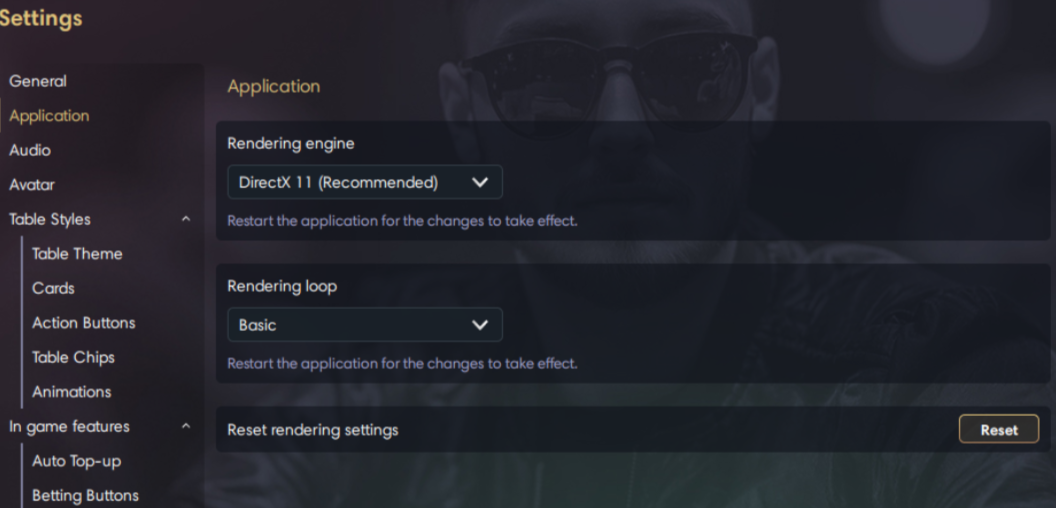 |
If the above is still not improving the situation, please switch the settings to : Rendering engine: OpenGL and to try with both types of Rendering loop.
If these recommendations don't help, please provide:
1 - Screen recording of the problem. 2 – Log files of the client 3 - OS and Video card drivers details . Recommended to update to the latest version.
Follow these steps to access the two specific directories needed.
- Access the Installation Directory Find the application shortcut on your desktop. Right-click the shortcut and select Open file location. This will open the main installation folder.
- Locate the First Log Folder In the main installation folder, look for the directory named log. Keep this folder accessible; it is the first item you need.
- Locate the Second Log Folder In the main installation folder, open the directory named data. Inside this folder, find the directory named logs. This is the second item you need.
Summary of Required Locations
You should now have identified these two specific paths: .../Installation Directory/log .../Installation Directory/data/logs